Best Gaming Mouse Q1 2026: 8 Tested and Compared
The gaming mouse market in early 2026 looks almost nothing like it did three years ago. Wireless used to mean a tradeoff - you gave up latency or battery life or both. Now the top wireless mice from Razer, Logitech, and the indie pack outperform their wired predecessors on every axis that matters. Sensors have ceiling-busted into 30,000+ DPI territory that no human hand can actually use. Weights have dropped under 60 grams for flagship models. Battery life has stretched past 90 hours.
So the real question in Q1 2026 isn't "which mouse has the best specs." All of the contenders here are functionally perfect. The question is which shape and which weight class fits your hand and your game, and which brand's software you can tolerate.
We tested eight of the most popular gaming mice across FPS, MMO, ergonomic, ambidextrous, and budget categories. Here's the shortlist worth your money.
The shortlist at a glance
| Category | Pick | Weight | Best for | |---|---|---|---| | Best overall | Razer DeathAdder V3 Pro | 64g | Right-handed players who want one mouse that does everything | | Best for FPS / pros | Logitech G Pro X Superlight 2 | 60g | Esports players who want the safest, most-used pro shape | | Best lightweight | Razer Viper V3 Pro | 54g | Claw grip, fast-flick FPS players | | Best ergonomic | Razer Basilisk V3 Pro | 112g | Right-handed palm grip, productivity + gaming | | Best for MMO | Razer Naga V2 Pro | 134g | WoW, FFXIV, and any game that needs 12+ buttons | | Best ambidextrous | Glorious Model O 2 Wireless | 68g | Lefties or anyone who likes symmetric shapes | | Best budget wired | Razer Cobra | 58g | Sub-S$80 starter mouse that doesn't feel cheap | | Honorable mention | SteelSeries Aerox 9 Wireless | 89g | Honeycomb shell, MMO-lite with 18 buttons |
How we tested
Every mouse on this list got at least two weeks of real-world use across three categories: a competitive FPS (Counter-Strike 2 or Valorant), an MMO or RPG with heavy keybind use (FFXIV or Path of Exile 2), and three days of normal desktop work. We checked weight on a kitchen scale (most published numbers are accurate), battery life by running each wireless mouse from 100% to dead, and sensor consistency by tracking tracking on three different surfaces - cloth pad, hard plastic pad, and bare desk.
We didn't bother with synthetic benchmark tests. Once a mouse crosses a basic competence threshold for sensor accuracy and click latency - and every mouse on this list does - what matters is how it feels in your hand for the first eight hours and the eighth hundred.
#1 Best overall: Razer DeathAdder V3 Pro
If you asked us to recommend exactly one gaming mouse to a stranger with no other context, this is it. The DeathAdder shape has been Razer's bestseller for nearly two decades for one reason: it fits more hands comfortably than any other shape on the market. The V3 Pro updates the formula with a 64-gram body (down from over 100g in the original), the Focus Pro 30K sensor, optical switches that won't develop double-click issues, and roughly 90 hours of battery life over 2.4GHz wireless.
It's not the lightest mouse here. It's not the most exotic. It's the safest "I won't regret this" pick for any right-handed player whose hand is bigger than a child's, and that's exactly what most people need.
The good: Universally comfortable shape, top-tier sensor, optical switches eliminate the most common long-term failure mode, no-nonsense design.
The bad: Software (Razer Synapse) is bloated and runs background processes you can't fully disable. Right-hand only.
Skip if: You have small hands (try the Viper or Cobra instead), you're left-handed, or you specifically want a fingertip-grip mouse.
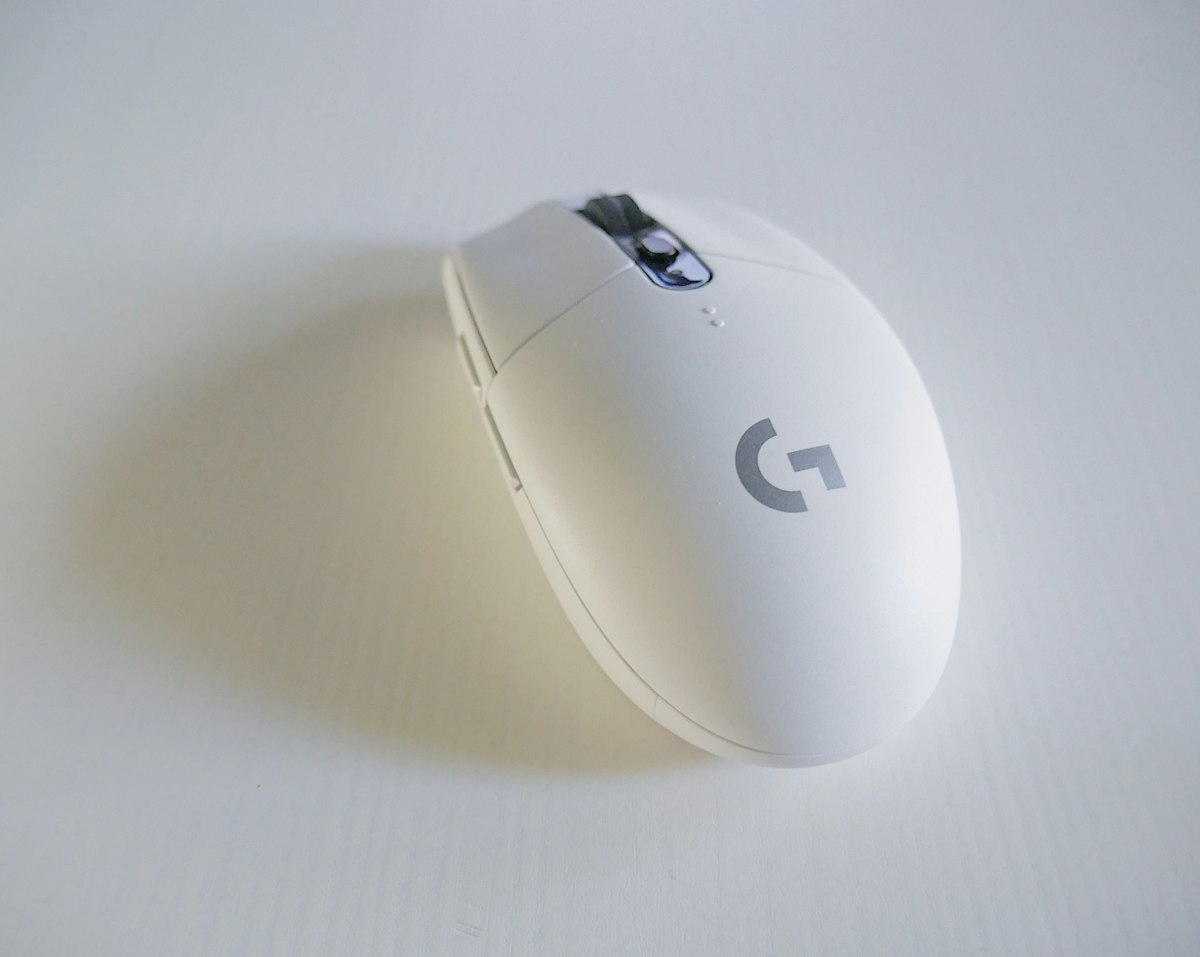
#2 Best for FPS / pros: Logitech G Pro X Superlight 2
The Superlight is what the majority of professional Counter-Strike, Valorant, and Apex players actually use, and the V2 finally fixes the two complaints from the original: it now has USB-C charging (the original used micro-USB in 2024, which was embarrassing), and the new HERO 2 sensor is genuinely improved. At 60 grams it's slightly heavier than the Razer Viper V3 Pro, but the symmetric shape is wider and slightly taller, which suits palm-grip players better than the Viper's flatter profile.
The real reason to pick this over a Razer alternative is software. Logitech G HUB is no one's favourite, but it's noticeably lighter than Razer Synapse and you can actually uninstall it without losing your saved DPI profiles (the mouse has onboard memory).
The good: Pro-level pedigree, USB-C, lighter software stack, onboard profile memory, ambidextrous shape.
The bad: No side buttons on the right side (the "ambidextrous" claim is marketing - there are still no thumb buttons for left-handers). Higher price than equivalent Razer.
Skip if: You play games that need more than two side buttons, or you want a strongly-contoured ergonomic shape.
#3 Best lightweight: Razer Viper V3 Pro
If you're a fingertip or claw grip player who flicks for a living, this is the lightest flagship mouse you can buy without resorting to a holes-everywhere honeycomb shell. At 54 grams the Viper V3 Pro is roughly the weight of a chicken egg, and Razer somehow fit a full-fat Focus Pro 35K sensor, 95-hour battery, and 8000Hz polling rate into it.
The shape is symmetric but flatter and narrower than the Logitech Superlight - better for claw and fingertip, worse for full palm grip. If you can't decide between this and the Superlight, the deciding factor is grip style: palm grip → Logitech, claw or fingertip → Razer Viper.
The good: Genuinely sub-60g without holes, high polling rate option, symmetric shape works for either hand, top-tier sensor.
The bad: Shape is too flat for palm-grip players. Premium pricing.
Skip if: You palm-grip and want a contoured fit, or you have large hands.
#4 Best ergonomic: Razer Basilisk V3 Pro
The Basilisk is the mouse for people who use their PC for more than gaming. At 112 grams it's significantly heavier than the FPS-focused picks above, but the trade-off is a deeply contoured right-handed shape, a tilt-click scroll wheel that switches between ratcheted and free-spinning (genuinely useful for browsing long pages or large spreadsheets), and 11 programmable buttons.
For productivity-focused players who want one mouse for both their workday and their evening Counter-Strike sessions, the Basilisk is the right answer. The heavier weight is actually a feature for slow-motion aiming and for anyone who finds 60g mice feel "twitchy."
The good: Productivity tilt-wheel is the best in class, comfortable for 8+ hours of use, plenty of buttons for workflow customization.
The bad: Too heavy for competitive FPS at high sensitivity. Right-hand only.
Skip if: You're a low-sensitivity FPS player who flicks the whole arm, or you need a symmetric shape.
#5 Best for MMO: Razer Naga V2 Pro
For the World of Warcraft, FFXIV, ESO, and Path of Exile crowd, there is exactly one credible answer in early 2026, and it's the Naga V2 Pro. The 12-button thumb grid is the obvious draw, but the genuinely clever feature is the swappable side plates: the V2 Pro ships with a 12-button MMO plate, a 6-button MOBA plate, and a 2-button standard plate, so the same mouse adapts to whatever you're playing that night.
At 134 grams it's the heaviest mouse on this list, but MMO players generally aren't sensitivity-sensitive in the way FPS players are. The weight is honestly fine for the use case.
The good: Best-in-class side button layout, swappable plates make it versatile, great sensor.
The bad: Heavy. Razer Synapse software is required to remap the 12 thumb buttons properly. Expensive.
Skip if: You don't play MMOs, or you can't tolerate Razer Synapse running in the background.
#6 Best ambidextrous: Glorious Model O 2 Wireless
Glorious built its reputation on the original Model O honeycomb-shell mouse, and the Model O 2 Wireless is the cleaner, wireless evolution. The shape is fully symmetric (with thumb buttons on both sides this time), the BAMF 2.0 sensor is in the same ballpark as the Razer and Logitech flagships, and the price is meaningfully lower than either.
This is the pick for left-handed players, for people who want a true ambidextrous shape with thumb buttons that work for both hands, or for anyone who finds the Razer and Logitech flagships overpriced for their needs.
The good: Genuinely symmetric, great sensor for the price, lighter software footprint.
The bad: Build quality feels a half-step below Razer and Logitech. Battery life is shorter (~70 hours vs 90+ for the flagships).
Skip if: You want the absolute best, or you're a heavy palm-gripper (the shape is on the smaller side).
#7 Best budget wired: Razer Cobra
The Cobra is what we hand to anyone asking "what's a good gaming mouse for under S$80." It's wired (which keeps the price down), it weighs 58 grams (lighter than most flagships), it has the same Razer optical switches as the DeathAdder Pro, and the sensor is more than good enough for any non-pro player. It's not the prettiest mouse on the list and the cable isn't paracord-grade, but for a starter mouse or a backup, it punches well above its weight.
If you can stretch to the wireless Cobra Pro (about double the price), it adds 2.4GHz wireless and a slightly upgraded sensor. For most people the wired version is the smarter buy.
The good: Best price-to-performance on the list, surprisingly light, real Razer optical switches.
The bad: Wired only. No customizable weights. Cable is stiffer than premium options.
Skip if: You specifically want wireless, or you're already spending S$200+ - get a flagship instead.
Honorable mention: SteelSeries Aerox 9 Wireless
The Aerox 9 is the answer for someone who wants Naga-style side-button density but in a much lighter honeycomb-shell package. At 89 grams with 18 programmable buttons (12 of them on the thumb grid), it's a credible MMO mouse that doesn't fatigue your wrist over long sessions. We ranked it as honorable mention because the Razer Naga V2 Pro's swappable plates make it more versatile, and SteelSeries Engine software is quirkier than Razer Synapse - but if you specifically dislike Razer, the Aerox 9 is the alternative.
What we'd skip
A few mice you'll see in other roundups that we think are not worth your money in Q1 2026:
- Anything from a no-name Amazon brand with "RGB Pro Esports" in the name. The sensors are usually fine but the switches die in 6-12 months and the software is unsupported.
- Razer DeathAdder Essential / DeathAdder V2 - older versions of the V3 Pro shape that are still on shelves. The price savings vs the Cobra aren't worth the older sensor and mechanical switches.
- Logitech G502 X Plus. The G502 shape has fans, but at 106g with a complicated 11-button layout, there are better options at every price point in 2026.
How to choose: the four things that actually matter
Forget the marketing pages. After testing all eight, the four things that actually determine whether you'll love or hate a mouse are:
1. Shape and grip style. Palm grippers want a tall, contoured shell (DeathAdder, Basilisk, G Pro Superlight). Claw and fingertip grippers want flatter, narrower shapes (Viper, Cobra). This matters more than any spec.
2. Weight class. If you play high-sensitivity FPS, you want under 70 grams. If you play strategy games or MMOs or use the mouse for productivity, 80-130 grams feels more controlled. Going lighter than 60 grams has diminishing returns and starts feeling unstable for slow movements.
3. Wireless or wired. In 2026 there is no real performance reason to choose wired except budget. Every wireless flagship on this list has lower latency than your monitor's response time. But wired is still ~30-40% cheaper for the same shape.
4. Software you can tolerate. Razer Synapse is the most feature-rich and the most bloated. Logitech G HUB is lighter but uglier. Glorious and SteelSeries software is functional but quirky. Whatever you pick, you'll be living with that software, so try the demo if you can.
For more components for a full gaming setup, check our guide on best gaming laptop deals.
FAQ
What's the best gaming mouse in Q1 2026 overall? The Razer DeathAdder V3 Pro is our top overall pick because its shape fits the widest range of right-handed players and the V3 Pro updates (64g weight, optical switches, Focus Pro 30K sensor) eliminate the older DeathAdder's weaknesses. For FPS-only players with ambidextrous preferences, the Logitech G Pro X Superlight 2 is the equally valid alternative.
Is a wireless gaming mouse worth it in 2026? Yes. Top wireless flagships now have lower latency than the refresh rate of any monitor you're likely to own, plus 90+ hours of battery life. The only real reason to buy wired in 2026 is to save 30-40% on the price.
What weight should a gaming mouse be? For competitive high-sensitivity FPS, under 70 grams. For MMO, productivity, or low-sensitivity arm-aim FPS, 80-130 grams feels more controlled. Sub-60g flagships exist but the returns diminish quickly and they can feel "twitchy" for slower movements.
Razer vs Logitech: which gaming mouse brand is better? Both make excellent flagship mice with virtually identical sensor and switch quality in 2026. Razer has more shape variety and dominates the MMO and ergonomic categories. Logitech has the most popular pro-tournament shape (G Pro Superlight) and lighter software. Pick based on shape preference, not brand loyalty.
Are honeycomb-shell mice worth it? They're lighter, but build quality varies widely and dust gets inside. If you want under 60 grams, the Razer Viper V3 Pro achieves it without holes. We'd only go honeycomb for the Glorious Model O 2 because the Glorious build is solid.
Do I need an 8000Hz polling rate? No. 1000Hz is fine for everyone except top-1% pro players on 360Hz+ monitors. The Razer Viper V3 Pro supports 8000Hz if you want it, but it dramatically reduces battery life and you won't notice the difference in normal play.
What's the best gaming mouse under S$100? The Razer Cobra wired. It's 58 grams, has the same optical switches as the DeathAdder V3 Pro, and a sensor that's more than sufficient for anyone short of a tournament player. Pair it with a decent mousepad and you'll be set.
The verdict
If you're a right-handed player and you don't have a strong opinion already, buy the Razer DeathAdder V3 Pro. It's the safest pick on this list and the one most people will be happiest with six months in.
If you specifically play competitive FPS at the highest level, buy the Logitech G Pro X Superlight 2 or the Razer Viper V3 Pro depending on your grip style - palm grip → Logitech, claw or fingertip → Viper.
If you play MMOs, buy the Razer Naga V2 Pro. It's not close.
If you want to spend the least amount possible without buying something you'll regret, buy the Razer Cobra wired for under S$80.
Whatever you pick from this list, you're getting a mouse that would have been considered a top-of-the-line flagship two years ago. The market has compressed so far that the bad options have been quietly phased out.
You Might Also Like
- Best Razer Gaming Mouse 2026: Tested and Ranked
- Best Gaming Top-Up Sites: UniPin vs SEAGM vs Codashop
- The Best Music Streaming in May 2026: We Tested 2 Options
OnlyCodes Deals
- Lazada - 20% Off Sitewide | Code: MENTHOBD20 | Get Deal
- Shopee - Flash Deals, Up to 80% Off | Get Deal
- Amazon - Latest Electronics Deals | Get Deal
---
OnlyCodes may earn a commission when you purchase through our links. This does not influence our recommendations.